Shape Up Review

Shape Up

Shape Up is written by Basecamp, the authors of Rework, Remote, It Doesn’t have to Be Crazy at Work, and Getting Real. Like many of their books, this one is very well done. It differs from some of their other books in that this is almost more like an autobiography. Like one would expect, it has clearly articulated descriptions of how they think work should be done, but this book is a deep dive into how they came to their internal process. Another unique thing is that Shape Up is free, but I would pay for it if it wasn’t.

Basecamp founders don’t seem to care much about common business practices, or what other people are doing. In fact, they sometimes seem to assume that everyone else is doing things wrong. They cleverly make fun of scrum, sprints, kanban, and others by saying that at Basecamp they aren’t “remotely tied to a metaphor that includes being tired and worn out at the end. No backlogs, no Kanban, no velocity tracking, none of that.”

The best parts

1) Appetite

The largest mind-shifting concept in the book is what they call “appetite.” They say, “Instead of asking how much time it will take to do some work, we ask: How much time do we want to spend? How much is this idea worth?” So it is the complete opposite of almost all Product team interactions I’ve had. I’m used to hearing something like, “How long with feature XYZ take?” but they flip it in reverse and say something like, “Can you complete XYZ in X time (6 weeks max)?”

How is this different, you ask? It ensures that planning, scoping, and thought were thorough enough to get a true benefit within a constrained amount of time. The time constraint is also a core concept. They offer a few edge case and exceptions, but for the most part they say that six weeks is the maximum time per iteration.

An appetite is completely different from an estimate. Estimates start with a design and end with a number. Appetites start with a number and end with a design.
— Shape Up

With this concept of appetite, they also don’t need to estimate. That is because Product limited the scope themselves and set the timeline.

2) Breadboarding and Fat Marker

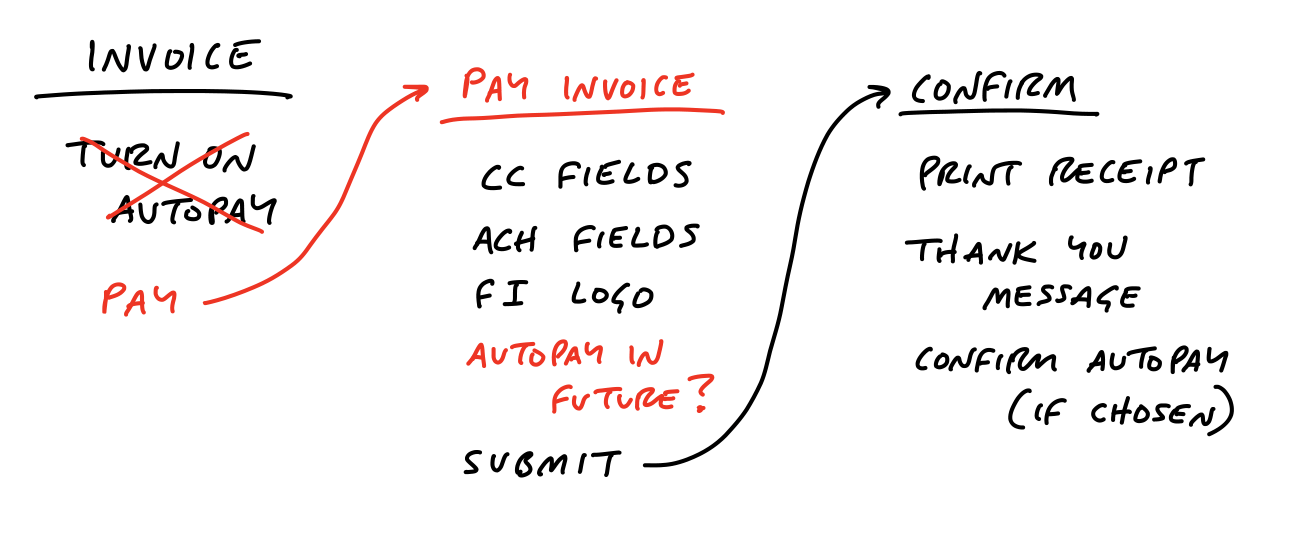
The second best part is the concept of Breadboarding and Fat Marker. This is more focused at the Product team and the Design team. Breadboarding is basically a user-flow/data-flow diagram. This step is a simple text based diagram.

This example (from the book) shows that they discovered that there was a flow problem with the new idea and they fixed it. The reason this is important is that they were able to discover the problem way before wasting time with high fidelity mock-ups or user testing or even worse, dev time.

Next, they move to low-fidelity mockups. Some people would call it wireframe. To help define this, they call it “Fat Marker”. It must be completed with a larger, single color marker. The point is simply to show interaction within the page. There are a number of possible shortcomings that can be identified.

The Dangers

1) Culture confusion

First off, it is important to understand that they built their culture around this style. It is important to realize that process mimics culture, and not the other way around. Remember, this is their autobiography of their company.

You can’t simply mimic their process. The key is to take pieces of their process and adapt them in a way that fits your company culture.

2) Passive Aggressive Implementation

In my experience, the Product team often tries to do too much at once since someone gave them the “green light.” So my job has often been to be the bad guy and tell them to cut scope and move things to a future phase. Initially, I was excited to flip the pressure back on them, by telling them that they only had “X” weeks and they needed to get things scoped better. While this felt like a great burden off of me, it also is clearly an aggressive tactic that isn’t a team decision.

It is easy to think of the Product team as an adversary that pushes for ridiculous things or interrupts fun technical plans. This is not in the book at all, but seeing how they portray their plan as so amazing, it makes one think that they figured it out. In reality, this book should simply be used as a collection of ideas. In most situations, the concepts cannot be implemented with perfect carbon-copy from the book. One must enjoy this fresh approach, realize that these ideas are equally as successful as others, and pluck pieces of wisdom from the book to apply to one’s own organization.


Chia Desk

Today is the five year anniversary of me and my team pranking a coworker after he returned from a long vacation. Kudos to all the people on the team that came in over the weekends to keep the chia properly watered.

Side note: Don’t forget to have fun at work. You spend way to much of your life there to not enjoy it.


Tech Debt Is Good


Sorry for the click bate sounding title, but honestly tech debt can be a good thing. Tech debt is often a dirty word. Before we go to far, I realize that many people have different definitions of technical debt. Is it code that is old? Is it code that I don’t understand? I’ve met some people that seem to call any code that they didn’t write, “tech debt”. My definitions of Debt Dept is:

Tech Debt: Any piece of code or architecture that slows down the development process or causes extra time to maintain.

You might say that that doesn’t sound like a good thing. The thing that makes tech debt a good thing is the “why” and “how” behind technical debt. If a team is following the agile process, then iteration is a critical part of the process.

Iteration and MVP implies that things are not perfect the first time. Then improvements are made to existing pieces of code on future iterations.

To be clear, technical debt is not just a by-product of tight deadlines and cutting corners. Good technical debt should be calculated and consist of on-purpose decisions to get to an MVP (or sometimes a MMF) before completing the full solution. This might mean hardcoding some data that “should” come from a database or putting data in an “overloaded” column.

One of the biggest challenges with technical debt as a software engineer is that it can feel like one is compromising standards or beliefs. Don’t fall into that false trap. The goal of a good software engineer is to deliver value. It can be tough, but it is important to have the self-confidence that a compromise doesn’t define us, it actually highlights how flexible we are.

The point is to see that the feature works from end-to-end. I’ve found that often times the problem with people complaining about technical debt is lack of managerial or product vision. Without a vision of why we are doing what we are doing, it is easy to start to think that code-coverage, abstraction, or some other buzz word is the goal.

Don’t get me wrong, quality should not be compromised. Unit tests should be written and QA should be completed. The compromise should be in the architecture, but in a way the either doesn’t go to far down the wrong path. Preferably, it should also lay the groundwork for the next iteration.

Another disclaimer: there are real issues with non-agile technical debt. Those issues should be added to a backlog and tackled just like other projects. Those types of things can reduce production scale, dev speed, lack of application observability, and a myriad of other problems.


Easter Eggs

I love easter eggs. I don’t mean the colorful ones. I mean hidden surprises in apps. Here’s a few of my favorites that I’ve made throughout the years.

Skittles

During the company summit the CTO made an analogy comparing the size of our “big data” to a bag of skittles. It became a running joke. His office even got pranked with every square inch covered with skittles. I added an easter egg to our UI that would show raining skittles whenever the user typed the word “skittles”.


Christmas Lights

Once a year on December 25th, a string of lights show up on the top of publisher.spotxchange.com. I made sure that it wouldn’t interfere with navigation. (Make sure fun doesn’t cause a high or critical ticket. ha.)


lights.ts
1
2
3
4
5
6
7
8
9
10
11
12
13
14
15
16
17
18
19
20
21
22
23
24
25
26
27
28
29
30
31
32
33
34
35
36
37
38
39
40
41
42
43
44
45
46
47
48
49
50
51
52
53
54
55
56
57
58
59
60
61
62
63
64
65
66
67
68
69
70
71
72
73
74
75
76
77
78
79
80
81
82
83
84
85
86
87
88
89
90
91
92
93
94
95
96
97
98
99
100
101
102
103
104
105
106
107
108
109
110
111
112
113
114
115
116
117
118
119
120
121
122
123
124
125
// Inspired by https://github.com/iamshaunjp/CSS-Tips-and-Tricks/blob/01-christmas-lights
class Lights {

private bulbWidth: number = 8;
private bulbHeight: number = 15;
private bulbSpacing: number = 20;
private bulbSpread: number = 3;
private oddRGB: string = [255, 65, 65].join(',');
private evenRGB: string = [190, 255, 42].join(',');


constructor() {
this.addStyles();
this.addLights();
}

private addStyles(): void {
const styleID : string = "christmasLightsStyles";
if (!document.getElementById(styleID)) {
let css : string = `
#lights-wire {
white-space: nowrap;
overflow: hidden;
position: absolute;
z-index: 9999;
margin: -15px 0 0 0;
padding: 0;
pointer-events: none;
width: 100%;
top: 8px;
}
#lights-wire li {
position: relative;
animation-fill-mode: both;
animation-iteration-count:infinite;
list-style: none;
padding: 0;
width: ${this.bulbWidth}px;
height: ${this.bulbHeight}px;
border-radius: 50%;
margin: ${this.bulbSpacing / 2}px;
display: inline-block;
box-shadow: 0px ${this.bulbHeight / 6}px ${this.bulbWidth * 2}px ${this.bulbSpread}px rgba(0,247,165,1);
animation-name: even-flash;
animation-duration: 2s;
}
#lights-wire li:nth-child(odd){
animation-name: odd-flash;
}
#lights-wire li:after {
content: "";
top: -2px;
left: 2px;
position: absolute;
width: 32px;
height: 10px;
border-top: solid #222 2px;
border-radius: 50%;
}
#lights-wire li:before {
content: "";
position: absolute;
background: #222;
width: 6px;
height: 7px;
border-radius: 2px;
top: -4px;
left: 1px;
}
#lights-wire li:last-child:after {
content: none;
}

@keyframes even-flash {
0%, 100% {
background: rgba(${this.evenRGB},1);
box-shadow: 0px 2px 20px 4px rgba(${this.evenRGB},1);
}
50% {
background: rgba(${this.evenRGB},0.5);
box-shadow: 0px 2px 20px 4px rgba(${this.evenRGB},0.3);
}
}

@keyframes odd-flash {
50% {
background: rgba(${this.oddRGB},1);
box-shadow: 0px 2px 20px 4px rgba(${this.oddRGB},1);
}
0%,100% {
background: rgba(${this.oddRGB},0.5);
box-shadow: 0px 2px 20px 4px rgba(${this.oddRGB},0.3);
}
}`;

let elStyle : HTMLStyleElement = document.createElement('style') as HTMLStyleElement;
elStyle.id = styleID;

elStyle.innerHTML = css;
document.getElementsByTagName('head')[0].appendChild(elStyle);
}
}

private addLights(): void {
let bulbs: number = Math.floor(window.innerWidth / this.bulbWidth * 1.5);

let $lights : JQuery = jQuery(
`<ul id="lights-wire">
${Array(bulbs).join('<li></li>')}
</ul>`) as JQuery;

$lights.appendTo('body');
}
}

/* istanbul ignore next */
const now: Date = new Date();
/* istanbul ignore next */
if (now.getDate() === 25 && now.getMonth() === 12 - 1) {
// delaying 1 sec to give the spinner time to show.
setTimeout(() => {
// tslint:disable-next-line:no-unused-expression
new Lights();
}, 1000);
}

Breakout Game

This is a throwback to Atari days when there was a block breaking game called Breakout. For about a year, we had a UI that had a group of large checkboxes for configurations. I called it the “wall of checkboxes”, which gave me the idea… Why not make it a game to break the boxes? This one was a little hard to trigger. To activate, the user had to triple click on a disabled checkbox.

Play for yourself and checkout the source code.


Guide To Creating A Team Vision

<Insert cliche photo of hands locked together here>

Despite the cliche sound of having a team vision it is quite unifying and helps the team function as a team. I’m going to skip the convincing of why a team vision is important, and focus on the how to create a team vision.

Trust is the foundation of a team. These first steps are built to help a team establish vulnerable trust. The team’s core values by the end are only possible if there is a firm foundation of trust between the members.

Vulnerability based trust is predicated on the simple and practical idea that people who aren’t afraid to admit the truth about themselves are not going to engage in the kind of political behavior that wastes everyone’s time and energy.
— Patrick Lencioni

Also, as a disclaimer this is given sort of as a script of steps that I wrote to guide the team to find their vision. I’ve modified it a little in this post to give more context. Parts to deliver to the team are in block quotes.

A lot of my inspiration and concepts are from Overcoming the Five Dysfunctions of a Team and Start With Why.

Step 1: Fill out personal form

About 24 hours before the team meeting send this linked pdf document to all the attendees and ask them to complete it before the session.

Step 2: Introduction

Mutual Trust is critical for a team. It is probably be the most important characteristic of a team. Some say it is critical for a team to function properly at all. Trust is the glue for communication, patience, teamwork, and understanding of those personal values you identified. You picked your personal values, now we want to find team values. So let’s do the awkward touchy-feely-stuff.

<joke about virtual Covid-19 trust fall>

Seriously though, we need to learn more about each other in order to understand what makes each person the way they are.

Step 3: Personal History & Values

Go around the group and have each person answer the following questions. I suggest the leader goes first. Don’t forget to set the example of being personal and vulnerable.

  1. Where did you grow up?
  2. How many siblings do you have and where do you fall in order?
  3. What was the most difficult, important, or unique challenge of your childhood — of being a kid?
  4. What was your worst job or worst trip?

Go around the group again and each person state their five values from the worksheet and why they picked each one. This can be combined with the first, but I prefer them separate.

Step 4: Go over “Start With Why”

Simon Sinek has a concept called “Start With Why.” Watch his TEDx talk if you haven’t read the book.

<draw circles> and explain the concepts.

The “why” says why you want to be on a team.
Think about Apple. They have an identity they they sell and also a passion to keep things simple. When they invented the iPod, it was natural to want it. Contrast that to Dell selling an MP3 player. They are both computer companies, but it only feels natural for Apple. Now they are breaking into the credit card market, which for some reason doesn’t seem that surprising.
Think about VW in the 2000s, they tried to make a luxury car, but it only lasted 2 years in the USA. Volkswagen’s name means “The People’s Car”. You are supposed to place flowers on the dashboard. VW had an identity, a “why”, but when they made something outside of their “why” no one was interested.

So how do we find our “why” as a team?

One way to detect the wrong “why” is by noticing an increase in stress or a decrease in passion.

The “Why” is a list of values, values shouldn’t be nouns/things. Not “honesty,” “innovation”, “communication”, etc. You can’t keep people accountable to nouns.

“Hey __, I need you to increase your innovation today.”

And if we have to write down something like “honesty” on the wall, we have bigger problems.

It needs to be verbs.
So Not integrity: it should be “We always do the right thing.”
So Not Innovation: it should be “We look at the problem from a different angle.”
Put the word “We…” in front.

Step 5: Team “Why” exercise

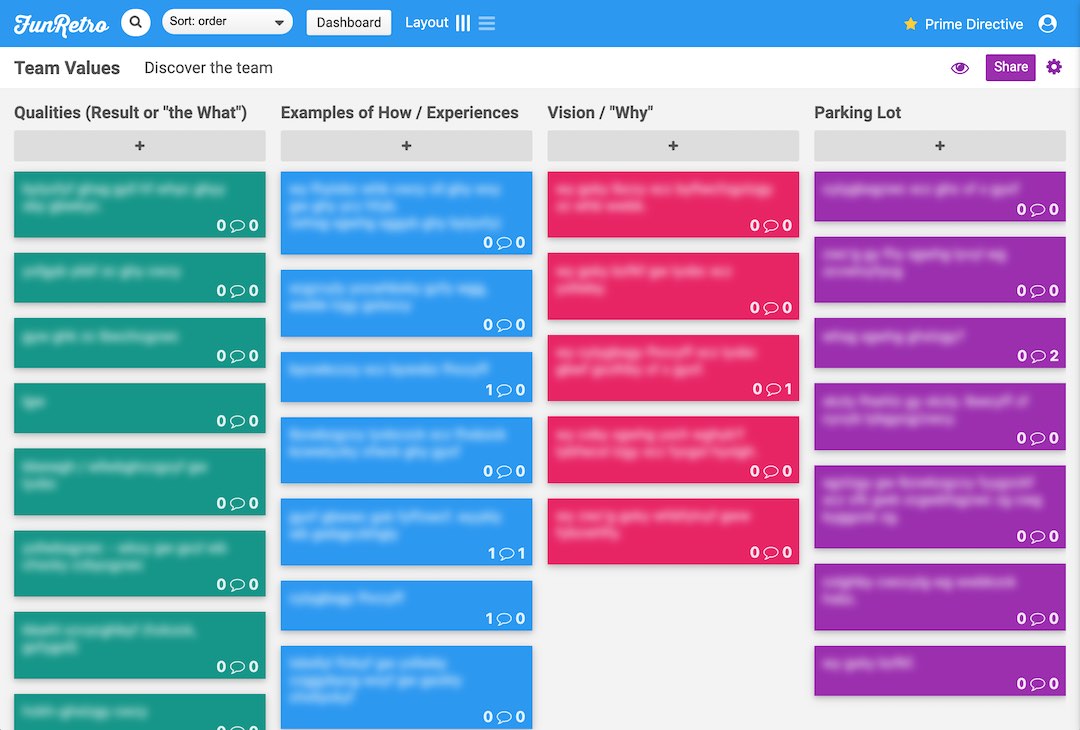
This is another interactive session. Everyone will need their computer for this. Funretro.io is a great interactive board. I feel that finding your why is sometimes quite challenging as it is often more of a feeling or idea. I found it easier to start on the outside, “the what”, and then identify “the how” and finally “the why.”

I created a board with these columns:

  1. Qualities (Result or “the What”)
    • This should be the things that are happen at work (or maybe want to see).
    • Examples: PTO, New Tech, Team Lunch, High-quality code
  2. Examples of How / Experiences
    • This should be the things we experience. It is okay it have negative ones, but it should be primarily positive. These can include “We …” statements. Often these include “the why”, and the team will refine on these during the last step.
    • Examples: Celebrate success, Share knowledge, Take risks, Work hard/play hard, Help for each other
  3. Vision / “Why”
    • This is the final goal. Normally there will only be 3-6 cards here.
  4. Parking Lot
    • This is a place to put thoughts that need expanded on when reviewing the columns, but they might pose to much risk or distraction at the time. Often negative cards can get put here. Then the negative idea can be investigated into why it happens.
    • Examples: “We work really hard” or “What about quality?”


Each of these column should be done one at a time. Start with only the first column. Everyone gets 10 minutes to fill out ideas. It is often a good idea to hide cards during the first half or more of the 10 minutes so people can get ideas without distraction of others. After everyone is done, go through all the cards and encourage people to speak to them as you go through them.

When moving to the second column remind people what “the how” means, and that it is okay if they put items that feel more like “the why” too. Try to answer “the how” for all “the whats” from the previous column. Once everyone is done, go through them all together again as a team.

This entire exercise is long. It is good to take a break (multiple hours break is okay, but probably best to keep within the same day) between “the how” and “the why”. I actually like to break after people fill in their ideas of “the why”, but before we all review them as a team. That way we review all “the hows” and convert them to “whys/vision” together as a group.

The third column is best by having only the leader do the writing while everyone contributes ideas. Keep in mind that they need to have “We …” statements. It is also good to try and make the vision statements sticky (aka memorable). For example, if the team wants to identify with something like “We are humble”, try to find a way to make it more personable. Ask again, “Why?” Something like “We don’t take ourselves too seriously” might fit the team’s vision better. Especially if the team wants to capture “fun” as a core value too.

Other notes

If people struggle to find ideas, here are some “How” idea generators (I haven’t needed to use these):

  • Write down a time at work when you felt the most happy or most rewarding.
  • Write down a time you left work excited.
  • Write down a time you were excited to go to work.
  • Write down your favorite project you’ve done.
  • Write down the most fun you’ve had at work.

Running Ad Hoc Docker

Just a quick tip for those that love docker and find themselves wanting an app running quickly.

First, I recommend to everyone that wants to work with Docker to read their e-book. It gets auto updated with every release so this book will never get out of date. Yeah, they do continuous delivery with their books. Haha.

Running web server with local files
docker run --rm -p 8080:80 -v `pwd`:/usr/share/nginx/html:ro nginx:1.15-alpine
  • --rm cleans up after the container exits
  • -p 8080:80 mounts host port 8080 to container port 80
  • -v ... mounts the local directory to nginx’s default hosting path
    • ${PWD} can be used instead of `pwd` to print-working-directory
  • -it (not used above) will give you an interactive terminal. (it technically doesn’t stand for that.)
  • Simply navigate in your browser to localhost:8080 to see your files.

Other examples:

# Interactive Node12 container
docker run --rm -it -v ${PWD}:/code -w=/code node:12 /bin/bash
# Interactive php7.4 container
docker run --rm -it -v ${PWD}:/code -w=/code php:7.4 /bin/bash
# Interactive python3 container
docker run --rm -it -v ${PWD}:/code -w=/code python:3-buster /bin/bash
# Run mysqldump to a local file
docker run --rm -i mysql:8 mysqldump <args> 1>dump.sql
# Run pg_dump to a local file
docker run --rm -i postgres:10.6 pg_dump <args> 1>dump.sql
# Interactively connect to redis
docker run --rm -it redis redis-cli -h <host>

But Why?

I can think of at least two reasons. First, you might want to run a different version of a piece of software than what is installed locally. Second, you might not want to install the software locally for various reasons.


Building A Serverless Website

The Plan

I wanted to start a tech blog of random things I’ve learned along my path. I’m hoping to help others, improve my communication skills, and hopefully have some fun. I also had some specific goals for building the site.

First, I wanted the site to be free (except for the hostname, which I already owned). I was inspired by things like github.io, as well as other sites, that publishes content for free.

Second, I wanted good and easy tech. In light of the first goal of wanting free, having an active database was unlikely. Honestly, an active database is overkill for a blog, and it just gives more overhead and security concerns. Something like git can be a database and there are tons of tools for it. I decided to go with a static site generator solution.

I looked into many options and tried several. I ended up settling on Hexo (CMS) + Github (DB) + Netlify (Builder + CDN). Hexo is a NodeJS project that allows the content to be written in markdown (yeah, the same as Wikipedia). This means that the content is portable and the CMS is familiar.

The Execution

I found an open source html/css design that I liked. Sadly, it wasn’t built for Hexo. I cloned the default “landscape” template from Hexo and modified it to look like the other design that I found. I probably spent most of my time, on UI/UX part.

Hexo by default uses styl for css. Ever heard of it? Yeah, me neither. Thankfully, they have good plugin support. I switched the css generator to scss. The html generator is ejs. I started switching to handlebars, and then other solutions, but ended up liking ejs. Hexo also offers a bunch of markup features for ejs that they call tag plugins.

_config.yml for scss
node_sass:
includePaths:
- node_modules

Now what about hosting? Netlify makes things quite easy and offers some good guides. I simply added a DNS entry for the cname matt.sloky.net on tool that manages my domain.

Publishing and Continuous Delivery

Now, all I have to do is add a new post, and then git push. In a couple minutes it gets automatically published! Since it is a static site, it isn’t quite as big of a deal, but I’m going to call this CD (Continuous Delivery) anyway! Ha!